🚀 KEDA + Knative
The Scaling Problem Nobody Talks About
You’ve containerized your application. You’ve deployed it to Kubernetes. You’ve set up horizontal pod autoscaling (HPA) based on CPU and memory. Everything feels good.
Then reality hits: your app doesn’t scale on CPU metrics alone.
Maybe you have a queue-based workload or you’re running scheduled batch jobs. Maybe you need to scale based on HTTP request latency, database connections, or custom business metrics. Standard Kubernetes HPA? It doesn’t handle any of this well.
Then you discover KEDA and Knative.
But before you redesign your autoscaling strategy, let’s talk about what they actually are, how they work together, and whether they’re the right fit for your workloads.
What Are KEDA and Knative?
KEDA: Kubernetes Event-Driven Autoscaling
KEDA scales workloads based on event sources and custom metrics — not just CPU and memory. It can scale based on:
- ▶️ Message queue depth (RabbitMQ, SQS, Azure Service Bus)
- ▶️ Kafka consumer lag
- ▶️ Database query results
- ▶️ Cron schedules
- ▶️ Custom metrics from any source
KEDA acts as a bridge between your event sources and Kubernetes’ native HPA, letting you define scalers declaratively.
Knative: Serverless on Kubernetes
Knative is a Kubernetes-native platform for building serverless applications. It provides:
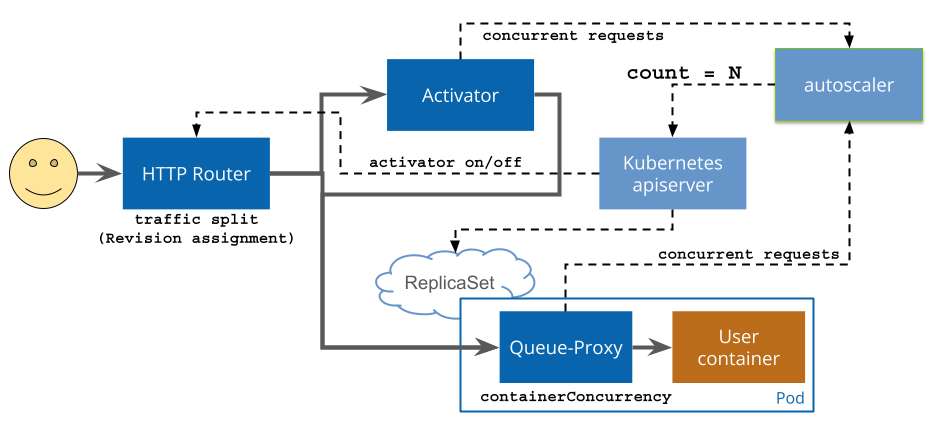
- ▶️ Knative Serving: Automatic scaling, traffic management, and revision control for HTTP services
- ▶️ Knative Eventing: Event-driven architecture with brokers, triggers, and event sources
- ▶️ Knative Functions: Deploy functions without managing containers
How They Complement Each Other
KEDA solves the “what triggers scaling” problem. Knative solves the “how do I deploy and manage serverless workloads” problem.
Together: Knative handles your service lifecycle (traffic, revisions, cold starts), while KEDA watches your event sources and drives the scaling decisions. We’ll get into the details below.
KEDA: Deep Dive
How KEDA Works
KEDA operates in three layers:
- ▶️ Scalers: Connectors to event sources (RabbitMQ, Kafka, AWS SQS, etc.)
- ▶️ Metrics: KEDA queries scalers and converts event data into scaling metrics
- ▶️ HPA Integration: KEDA creates/updates Kubernetes HPA objects based on scaler metrics
apiVersion: keda.sh/v1alpha1
kind: ScaledObject
metadata:
  name: rabbitmq-scaler
spec:
  scaleTargetRef:
    name: worker-deployment
  minReplicaCount: 1
  maxReplicaCount: 100
  triggers:
    - type: rabbitmq
      metadata:
        host: amqp://rabbitmq:5672
        queueName: tasks
        mode: QueueLength
        value: '30' # scale up when queue has 30+ messages
When you apply this, KEDA watches the tasks queue, polls every 30 seconds, and scales worker-deployment from 1 to 100 replicas — targeting 30 messages per replica.
KEDA: Pros
KEDA can scale on virtually any metric — queue depth, DB queries, HTTP endpoints, custom webhooks and so on. It integrates natively with Kubernetes by using standard HPA under the hood, so there are no proprietary APIs to worry about. With 50+ scalers covering most use cases and a straightforward custom scaler API, you can accomplish every event-scaling need.
Knative: Deep Dive
How Knative Serving Works
apiVersion: serving.knative.dev/v1
kind: Service
metadata:
  name: hello-world
spec:
  template:
    spec:
      containers:
        - image: gcr.io/knative-samples/hello
          env:
            - name: TARGET
              value: 'World'
Apply this and Knative creates a Deployment, manages traffic routing, handles scale-to-zero, and gives you revision-based rollbacks. New deployment? Just update the image — Knative creates a new revision and you can split traffic between them.
Knative Eventing
Knative Eventing lets you build event-driven architectures with brokers and triggers:
apiVersion: eventing.knative.dev/v1
kind: Trigger
metadata:
  name: my-trigger
spec:
  broker: default
  filter:
    attributes:
      type: com.example.sampletype1
  subscriber:
    ref:
      apiVersion: serving.knative.dev/v1
      kind: Service
      name: event-handler
Knative: Pros and Cons
Knative gives you a genuinely good serverless developer experience — deploy your code and let it handle scaling, traffic management, and revisions. It scales to zero automatically and transparently, with no manual HPA configuration needed. Traffic splitting for canary releases and A/B testing is built in. Rollbacks are trivial: just switch traffic back to a previous revision. And since it runs on any Kubernetes cluster, you’re not locked into a specific cloud provider.
The trade-offs are real, though. Knative introduces a set of new concepts — Services, Revisions, Brokers, Triggers — that take time to internalize. Scale-to-zero sounds great until you hit cold starts of 5–30 seconds depending on your image size and startup time. And running it in production requires a solid understanding of Kubernetes networking and ingress, which adds meaningful operational complexity.
KEDA vs. Knative: When to Use What
| Aspect | KEDA | Knative |
|---|---|---|
| Purpose | Event-driven autoscaling | Serverless application platform |
| Scope | Scaling decisions only | Deployment, traffic, events |
| Learning curve | Moderate | Steep |
| Cold starts | N/A | 5–30s |
| Event sources | 50+ scalers | Kafka, HTTP, custom |
| Traffic management | None | Excellent |
| Revision control | None | Built-in |
| Best for | Queue/metric-driven workloads | Serverless HTTP services |
Use KEDA alone when you have traditional Deployments that need event-driven scaling and you want full control over your Kubernetes resources. Classic example: a worker pool consuming SQS messages.
Use Knative alone when you want a serverless experience — scale to zero, traffic splitting, easy rollbacks — and your trigger is HTTP traffic.
Use both when you want Knative’s developer experience but need to scale based on something other than HTTP traffic (Kafka lag, queue depth, custom metrics).
Real-World Scenario: Processing a Kafka Stream
You have a Kafka topic with user events. Requirements:
- ▶️ Scale up when consumer lag grows
- ▶️ Scale down to zero when idle
- ▶️ Deploy new versions without downtime
Here’s the full setup:
# 1. Knative service — handles deployment, traffic, revisions
apiVersion: serving.knative.dev/v1
kind: Service
metadata:
  name: event-processor
spec:
  template:
    metadata:
      annotations:
        autoscaling.knative.dev/minScale: '0'
        autoscaling.knative.dev/maxScale: '100'
    spec:
      containers:
        - image: gcr.io/my-project/event-processor:v1
          env:
            - name: KAFKA_BROKERS
              value: 'kafka-broker:9092'
            - name: KAFKA_TOPIC
              value: 'user-events'
            - name: KAFKA_GROUP
              value: 'event-processor-group'

---
# 2. KEDA ScaledObject — drives scaling based on Kafka lag
apiVersion: keda.sh/v1alpha1
kind: ScaledObject
metadata:
  name: event-processor-scaler
spec:
  scaleTargetRef:
    name: event-processor
  minReplicaCount: 0
  maxReplicaCount: 100
  triggers:
    - type: kafka
      metadata:
        bootstrapServers: kafka-broker:9092
        consumerGroup: event-processor-group
        topic: user-events
        lagThreshold: '50'
What you get:
- ✅ Scales to zero when there are no events (Knative)
- ✅ Scales up based on Kafka lag, not just HTTP traffic (KEDA)
- ✅ Traffic splitting for zero-downtime deploys (Knative)
Conclusion
I used KEDA and Knative together in a project with a micro-UI architecture and 70+ microservices. We needed a messaging system (RabbitMQ in our case) to support transactions spanning multiple services via the saga pattern. The learning curve was steep, as I mentioned, but the result is pretty amazing.
Watching an entire product scale down to zero — well, the few pods for login and the main UI stayed online — and then seeing the relevant UI and business logic microservice pods spin up the moment a user logs into their organization tenant, all driven by events… that’s just awesome. Rolling out microservice updates via traffic splitting was equally impressive.
And you literally get perfect distributed tracing for free, visualized through Jaeger — but that’s a story for another blogpost 👋