🦄 Spark on Kubernetes
The Problem with Running Spark on Kubernetes
Kubernetes is great at running services. It’s not great at running batch workloads — at least not out of the box.
The default Kubernetes scheduler was designed for long-running services, not for Spark jobs that need to spin up a driver and 50 executors simultaneously, process data, and disappear. When you try to run Spark on Kubernetes with the default scheduler, you run into a set of familiar problems:
- ▶️ No workload queuing — if the cluster is full, Kubernetes rejects your job outright. You implement retry logic. It gets messy.
- ▶️ No multi-tenancy — all workloads share the same resource pool. Team A’s heavy job starves Team B’s pipeline.
- ▶️ No gang scheduling — Spark needs a driver and executors. The default scheduler allocates pods one by one. You end up with a driver running but no executors, burning resources while waiting.
- ▶️ Inefficient autoscaling — without gang scheduling, the cluster autoscaler doesn’t know how many nodes a job actually needs upfront. It scales reactively, in batches, with significant delays.
This is where Apache YuniKorn comes in.
What is Apache YuniKorn?
YuniKorn is a Kubernetes scheduler built specifically for batch and big data workloads. It replaces (or augments) the default Kubernetes scheduler and adds:
- Hierarchical resource queues — define queues per team, project, or environment with guaranteed and maximum resource limits
- Gang scheduling — allocate all resources for a job at once, or not at all
- Application-aware scheduling — YuniKorn understands the concept of an “application” (driver + executors), not just individual pods
- Fair scheduling and preemption — configurable priorities, preemption policies, and user/group quota enforcement
- Web UI — visibility into queues, applications, and resource utilization
It’s used in production by Apple, Alibaba, Visa, Lyft, Zillow, and Cloudera. AWS themselves recommend YuniKorn with gang scheduling for running EMR on EKS.
Gang Scheduling: The Key Feature
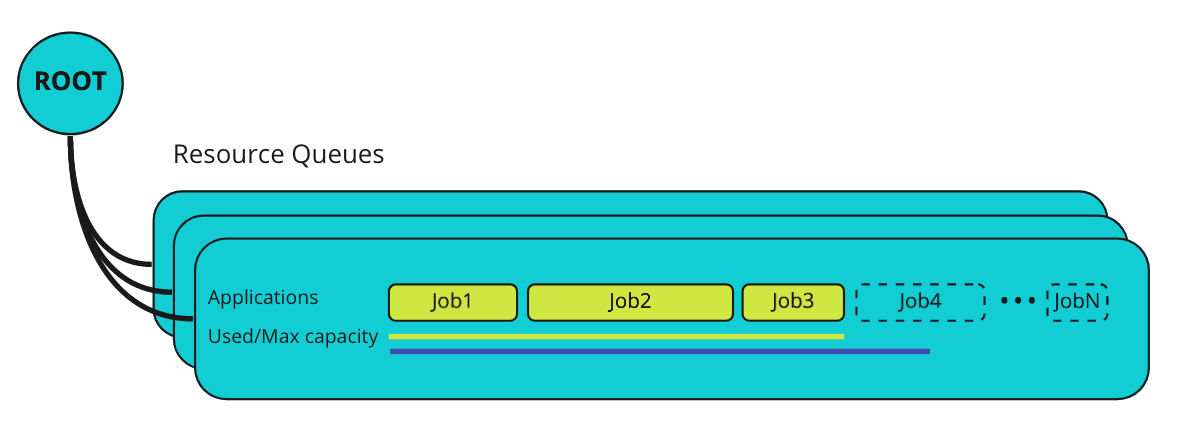
Gang scheduling is the most important thing YuniKorn brings to Spark on Kubernetes. Here’s why it matters.
The Resource Segmentation Problem
Without gang scheduling, when multiple Spark jobs compete for limited resources, you get this:
Job 1: [driver ✅] [executor ⏳] [executor ⏳] [executor ⏳]
Job 2: [driver ✅] [executor ⏳] [executor ⏳] [executor ⏳]
Job 3: [driver ✅] [executor ⏳] [executor ⏳] [executor ⏳]
Every job has a driver running but no executors. All jobs are stuck. The cluster is deadlocked.
With gang scheduling:
Job 1: [driver ✅] [executor ✅] [executor ✅] [executor ✅]  ← running
Job 2: [driver ⏳] [executor ⏳] [executor ⏳] [executor ⏳]  ← waiting
Job 3: [driver ⏳] [executor ⏳] [executor ⏳] [executor ⏳]  ← waiting
Job 1 gets all its resources and runs. Jobs 2 and 3 wait in the queue. Predictable, no deadlocks.
How It Works
You define TaskGroups in your Spark job spec — one for the driver, one for executors:
# Spark application annotations for YuniKorn gang scheduling
yunikorn.apache.org/task-group-name: 'spark-driver'
yunikorn.apache.org/task-groups: |
  [{
    "name": "spark-driver",
    "minMember": 1,
    "minResource": {"cpu": "1", "memory": "2Gi"}
  }, {
    "name": "spark-executor",
    "minMember": 10,
    "minResource": {"cpu": "2", "memory": "4Gi"}
  }]
When the job is submitted, YuniKorn:
- Creates lightweight placeholder pods for all task groups (1 driver + 10 executors)
- Waits until all placeholders are scheduled — this triggers the cluster autoscaler in one shot
- Swaps placeholders with real pods once resources are available
- Cleans up any over-reserved placeholders
The result: the autoscaler sees the full resource demand immediately and scales the cluster to the right size in one event, instead of scaling reactively in multiple waves.
Soft vs Hard Gang Scheduling
YuniKorn supports both:
- Hard gang scheduling — all or nothing. If the full resource set can’t be allocated, the job waits.
- Soft gang scheduling — tries gang scheduling first, falls back to normal scheduling if it can’t be satisfied. Useful for jobs that can make progress with fewer executors.
Hierarchical Queues
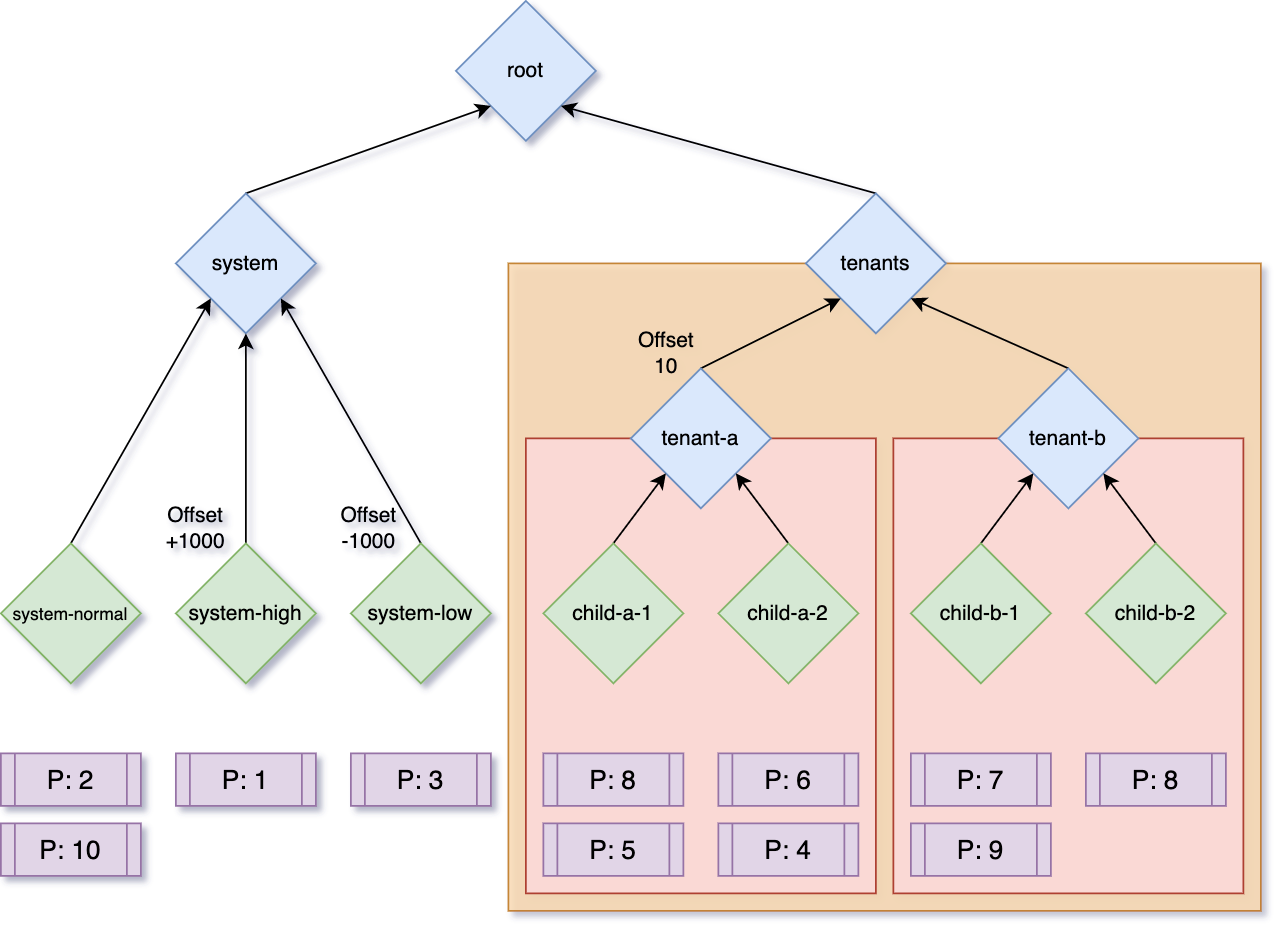
Beyond gang scheduling, YuniKorn’s queue system is what makes multi-tenant Spark clusters actually manageable:
queues:
  - name: root
    queues:
      - name: data-engineering
        resources:
          guaranteed: { cpu: '40', memory: '200Gi' }
          max: { cpu: '80', memory: '400Gi' }
        queues:
          - name: team-a
            resources:
              guaranteed: { cpu: '20', memory: '100Gi' }
          - name: team-b
            resources:
              guaranteed: { cpu: '20', memory: '100Gi' }
      - name: ml-training
        resources:
          guaranteed: { cpu: '20', memory: '100Gi' }
          max: { cpu: '60', memory: '300Gi' }
Each team gets guaranteed resources and can burst up to the queue maximum. No team can starve another. Jobs queue within their allocation instead of being rejected.
YuniKorn vs AWS Glue
So where does AWS Glue fit in?
| Aspect | YuniKorn + Spark on K8s | AWS Glue |
|---|---|---|
| Setup | Moderate — deploy YuniKorn, configure queues | Zero — fully managed |
| Ops burden | You own the cluster | None |
| Scheduling control | Full — gang scheduling, queues, priorities | None |
| Multi-tenancy | Built-in via queues | Limited |
| Spark version | Any | Glue-managed (Glue 4.0 = Spark 3.3) |
| Autoscaling | Efficient with gang scheduling | Automatic |
| Cost model | EC2/spot pricing + cluster overhead | Per DPU-hour (managed premium) |
| Vendor lock-in | None | AWS-only |
| Debugging | Standard Spark UI + YuniKorn UI | CloudWatch + limited Spark UI |
| Cold start | Fast (warm cluster) | Slower (job startup overhead) |
| Best for | High-volume, multi-tenant, cost-sensitive | Low-ops, occasional ETL, AWS-native teams |
When Glue Makes Sense
Glue is genuinely good if you’re running occasional ETL jobs and don’t want to manage infrastructure. You pay a premium for the managed service, but you get zero ops overhead, native AWS integrations (S3, Glue Catalog, IAM), and serverless scaling. For teams that run a handful of pipelines and don’t want to think about Kubernetes, it’s hard to beat.
When YuniKorn + Spark on K8s Makes Sense
The economics shift when you’re running Spark at scale. Glue’s per-DPU pricing adds up quickly for high-volume workloads. With Spark on EKS and spot instances, you can run the same workloads at significantly lower cost — often 50–70% cheaper for sustained usage — at the expense of managing the cluster.
Beyond cost, YuniKorn gives you something Glue simply can’t: control over scheduling. If you have multiple teams sharing compute, complex job dependencies, or ML training workloads that need gang scheduling, Glue’s “submit and wait” model doesn’t cut it.
The combination of YuniKorn’s gang scheduling + Kubernetes cluster autoscaler + spot instances is particularly powerful: jobs get their full resource allocation in one autoscaling event, spot interruptions are handled gracefully, and you’re paying EC2 spot prices instead of Glue DPU rates.
The Verdict
AWS Glue is the right choice if you want zero ops and you’re already deep in the AWS ecosystem. The managed experience is genuinely good for straightforward ETL.
YuniKorn + Spark on Kubernetes is the right choice if you’re running Spark at scale, need multi-tenancy, or want to optimize costs. The gang scheduling feature alone solves real problems that the default Kubernetes scheduler can’t — resource deadlocks, inefficient autoscaling, and unpredictable job runtimes. The fact that AWS themselves recommend it for EMR on EKS says a lot.
If you’re already running Kubernetes and considering Spark workloads, YuniKorn should be your first stop before reaching for Glue.